Companies may need to restrict who can create, update, or delete important project records.
Construction approval workflow software
Construction Workflows and Approvals,
Under Control
Give your construction team clear approval rules for projects, site photos, materials, and team access. With Construkt, owners and admins can review selected actions before they take effect.
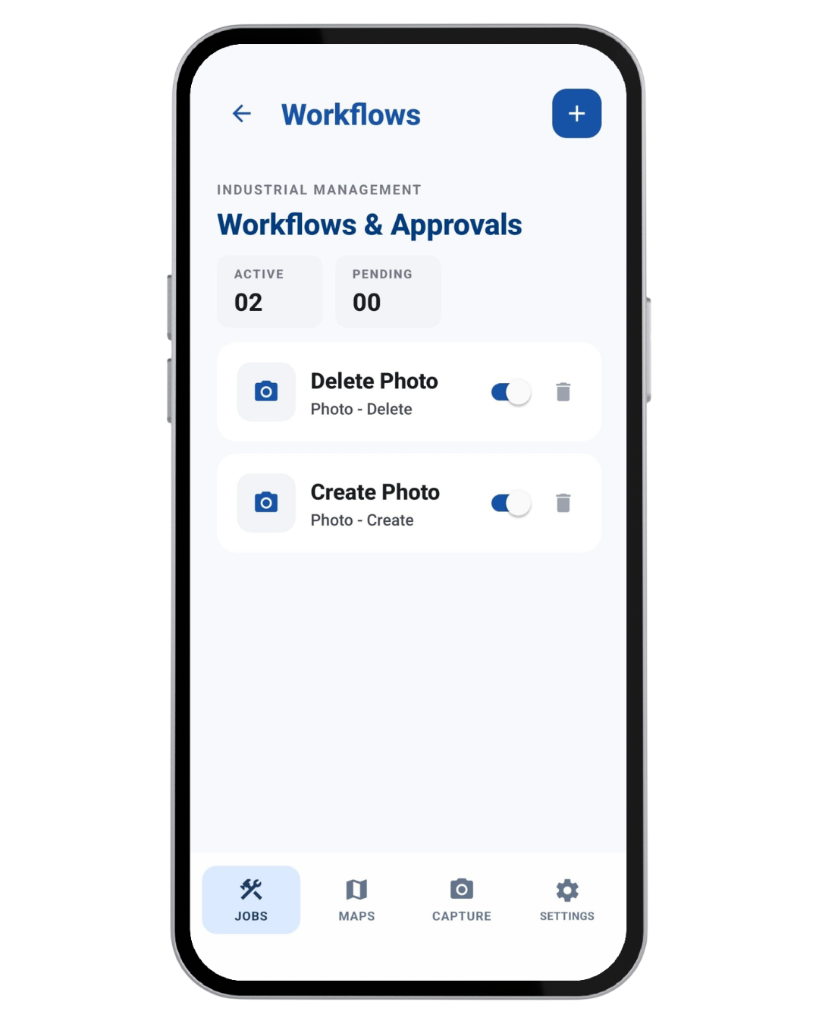
Control without delay
Important Actions Need Control Without Slowing the Site Down
Different construction actions carry different levels of risk. A routine update should not face the same process as deleting a project record, changing an official site photo, or admitting a new company member.
Site photos can form part of the job record and may need protection from unapproved changes or deletion.
Materials can require a responsible person's quality sign-off after delivery.
Owners may want to review join-code requests before granting company access.
Decisions made through informal messages are harder to follow later.
Construkt applies approval rules only to supported actions selected by the company. It is not a universal approval engine for every product feature or every operational decision.
The basic rule
What Are Construction Workflows and Approvals?
A workflow is a company rule that identifies a supported action requiring review and the role responsible for deciding whether it proceeds.
Name and description
Give the workflow a clear purpose that owners, admins, and field teams can understand.
Resource type
Choose the supported resource being controlled: Job, Photo, Material, or User.
Trigger action
Select Create, Update, or Delete where that action is supported for the chosen resource.
Approver role
Set Owner or Admin as the role responsible for reviewing matching requests.
Active or inactive
Enable or disable a workflow rule without deleting its configuration.
Optional approval period
Set the number of days associated with a pending request's expiry and the approval policy shown by the product.
A company can have only one workflow for each resource-and-action combination. For example, it cannot configure two separate Photo Create workflows. These are single-stage role-based approvals, not arbitrary multi-step chains.
Supported workflow types
Control Important Actions Across the Company
Each workflow covers a specific practical decision. Only the supported combinations below should be treated as approval-controlled actions.
Job workflows
Apply approval control to supported project or maintenance-job actions.
- Create: the job is created only after the request is approved.
- Update: supported changes to an existing job are held until approval.
- Delete: deletion waits for approval before it is executed.
Photo workflows
Protect supported changes to photos that contribute to the project record.
- Create: a site photo waits for approval before entering the official project record.
- Update: supported metadata changes, such as notes or documentation category, wait for approval.
- Delete: deletion is held for review, subject to relevant project-lock rules.
Material workflow
Record a delivery immediately while keeping its quality-check status pending.
- Create: the material entry is saved immediately but remains not quality-checked until an authorized approver signs off.
User workflow
Review access requested through the company's join code.
- Create: when join-by-code approval is enabled, signup creates a membership request instead of immediate full membership.
Not every resource supports every action. In particular, material creation is not blocked: the entry is recorded and the approval controls its quality-checked status.
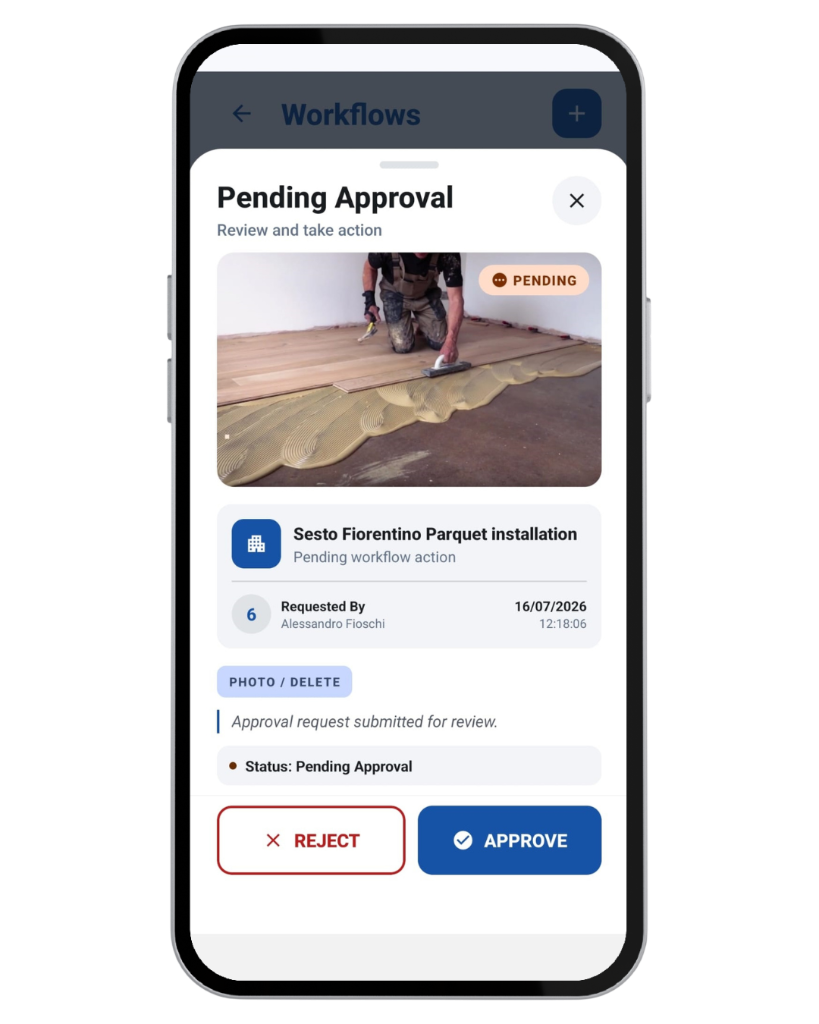
Pending approvals
One Place to Review Pending Requests
When a non-approver performs an action covered by an active workflow, Construkt prepares a request for an authorized owner or admin.
- 1
Construkt creates a pending request linked to the matching workflow.
- 2
The request stores the action data needed to carry out the intended operation after approval.
- 3
The company receives an approval-required notification.
- 4
The requesting member is told that the action was submitted for review.
- 5
The request appears in the shared queue with relevant context such as project, photo, material, requester, and action.
Approve
Construkt records the approval and attempts the stored action. For create requests, the actual record is created after approval.
Reject
The request is closed without carrying out the underlying create, update, or delete action.
If approval is recorded but execution fails, Construkt can warn that approval succeeded while the action failed. Authorized owners or admins whose role matches the workflow can perform covered actions immediately instead of submitting them to their own queue.
A different approval pattern
Material Quality Checks Without Blocking Site Recording
A delivery still needs to be logged when it arrives, even when the company requires a responsible person to verify its quality.
- The material entry is saved immediately.
- It remains marked as not quality-checked while approval is pending.
- An authorized approver can clear the pending quality check.
- Approval records the quality-check status, timestamp, and approver.
Example
Electrical supplies arrive on site
A team member records the delivery so it is visible to the project. A responsible owner or admin then checks the materials and signs off their quality status.
Construkt records the workflow and sign-off. It does not inspect materials automatically, validate certifications, or make the technical quality decision.
Company access
Control Who Joins the Company
Company settings can require review when a person signs up using the company's join code.
- The signup submits a membership request.
- The person does not immediately become a full company member.
- The request appears in the shared approval inbox.
- An owner or admin can approve it and complete company membership and role assignment.
Enterprise workflows
Creating and managing configurable Workflows & Approvals rules is an Enterprise feature.
Join-by-code approval
Smaller companies can enable join-code approval in company settings without the full Enterprise workflow configuration feature.
Join-by-code membership approval uses the shared approval queue. This does not mean every invitation or signup method automatically requires approval.
Workflow administration
Configure and Manage Approval Rules
In Enterprise, owners and admins can create, edit, activate, deactivate, and delete workflow rules. Configuration decides what requires review; the approval queue is where individual decisions are made.
- 01
Select the resource
Choose Job, Photo, Material, or User.
- 02
Choose the action
Select a supported Create, Update, or Delete trigger.
- 03
Set the approver
Require the Owner or Admin role.
- 04
Describe the rule
Add a clear name, description, and optional approval period.
- 05
Enable it
Activate the workflow when the company is ready to use it.
The optional approval period is stored as a number of days associated with pending-request expiry and the product's stated policy. No additional escalation behavior is claimed here.
Roles and records
Roles, Audit Logs, and Company Governance
Approval rules add a decision point to selected actions, while audit logging can add a separate record of relevant activity.
Workflow managers
Owners and admins manage Enterprise workflow configuration.
Authorized approvers
The workflow specifies Owner or Admin, and people whose role matches that setting can review the request.
Enterprise audit logs
Where supported, audit logging can provide an additional record of relevant actions and workflow activity.
Approvals determine whether a supported action proceeds. Audit logs help record relevant activity. Construkt does not claim that every action is logged on every plan, that records are immutable, or that approvals guarantee regulatory compliance.
Across Construkt
How Workflows Fit Into the Rest of Construkt
Approval workflows connect to specific product areas without merging those tools into one generic process.
Projects and maintenance jobs
Supported create, update, or delete actions can require approval.
Site photos
Supported uploads, metadata changes, and deletions can be held for review.
Materials
Material creation can require quality sign-off while the entry is recorded immediately.
Team access
Join-by-code requests can require owner or admin approval when the setting is enabled.
Audit logs and reports
Complementary documentation tools help teams understand and record project activity.
Project document and drawing uploads are not governed by the workflows described on this page. Generated reports are also separate from approval requests.
Explore Construkt's complete site-operations workflow →Practical examples
Two Approval Workflows in Practice
Protect project records
A company enables approval for job deletion. A team member requests deletion, and an authorized owner or admin reviews the request in Pending Approvals before approving or rejecting it.
Record materials and confirm quality
A team member records a delivery. The entry remains visible but not quality-checked until an authorized approver reviews it and records the sign-off details.
Who is it for?
For Companies That Need Clear Responsibility
Workflows & Approvals help teams review selected actions without turning Construkt into an ERP, quality-management system, or regulatory compliance platform.
- Construction company owners and administrators
- Project managers
- Site supervisors and foremen
- Teams documenting site work with photos
- Companies requiring material quality sign-off
- Businesses controlling new company membership
FAQ
Construction Workflow and Approval Questions
What is a construction approval workflow?
It is a company rule that identifies a supported construction action requiring review and the Owner or Admin role responsible for approving or rejecting it.
Can construction companies require approval before deleting a project?
Yes. An active Job Delete workflow can hold a project or maintenance-job deletion request until an authorized approver decides whether it should proceed.
Can site photos require approval before they are added or changed?
Yes. Supported Photo Create and Update workflows can hold a new photo or metadata change for review. Photo Delete can also require approval, subject to relevant project-lock rules.
How does material quality approval work?
The material entry is saved immediately but remains not quality-checked. An authorized approver reviews the request and can record the quality-check status, time, and approver.
Who can approve workflow requests in Construkt?
A workflow specifies Owner or Admin as its approver role. Owners or admins whose role matches that setting can review the request.
Can new team members require approval before joining a company?
Yes. When join-by-code approval is enabled, signup creates a membership request in the shared queue instead of immediate full membership. This setting can be available without full Enterprise workflow configuration.
Does approving a request automatically execute the action?
Construkt records the approval and attempts the stored action. If execution fails, the product can warn that approval succeeded but the action did not. Guaranteed execution is not promised.
Which Construkt plan includes workflow configuration?
Creating and managing configurable Workflows & Approvals rules is an Enterprise feature. Join-by-code membership approval is a separate company setting that can be used by smaller companies.
Can I disable a workflow without deleting it?
Yes. A workflow rule can be activated or deactivated without deleting its configuration.
Do project drawing uploads use the same approval workflows?
No. Project document and drawing uploads are not governed by the Job, Photo, Material, and User workflows described on this page.
Keep Important Construction Decisions Under Control
Set clear approval rules for project changes, site photos, material checks, and company access with Construkt.
Download App