What still needs to be done?
Open the project task list and see the work that is still pending or in progress.
Organize the work that needs to get done on every construction project. Assign tasks to your team, track progress and due dates, and keep outstanding work visible from the job site.
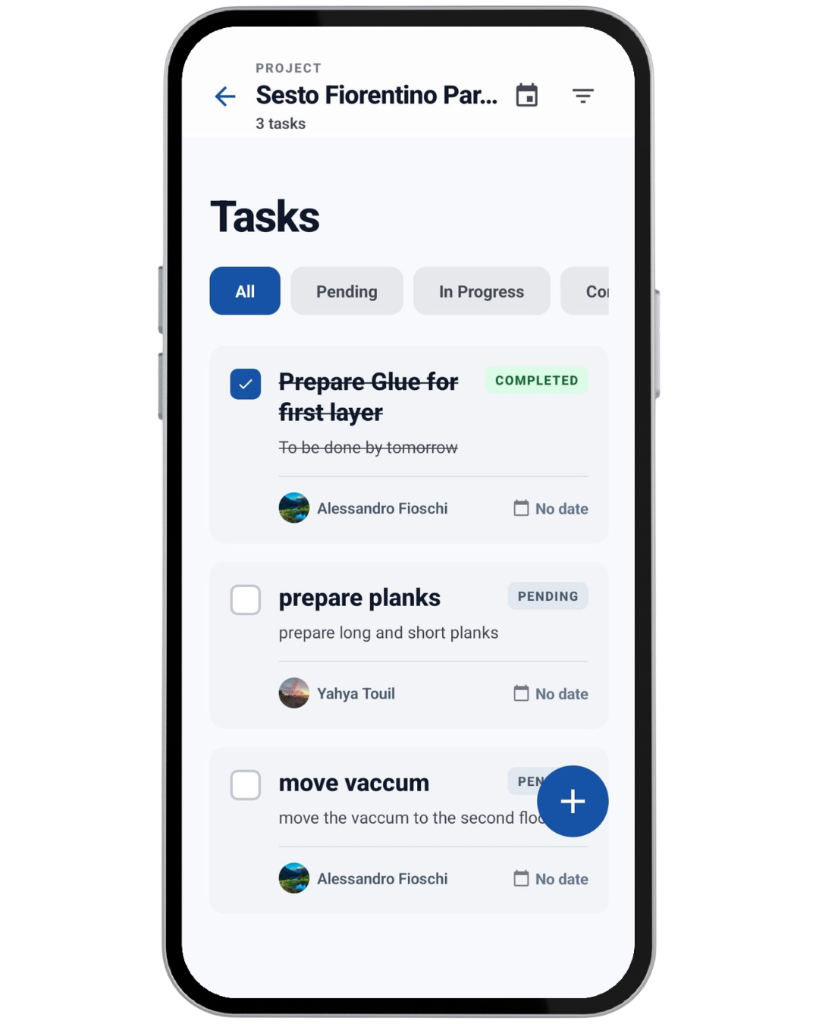
Each construction project has its own task list, sitting alongside Activity, Timeline, Drawings, Materials, and Settings. It answers three everyday questions about that job.
Open the project task list and see the work that is still pending or in progress.
Each task can be assigned to a member of that project’s team, or left unassigned.
Status shows whether a task is pending, underway, or finished, so outstanding work stays visible.
This is a work plan for one construction project, not a company-wide to-do list.
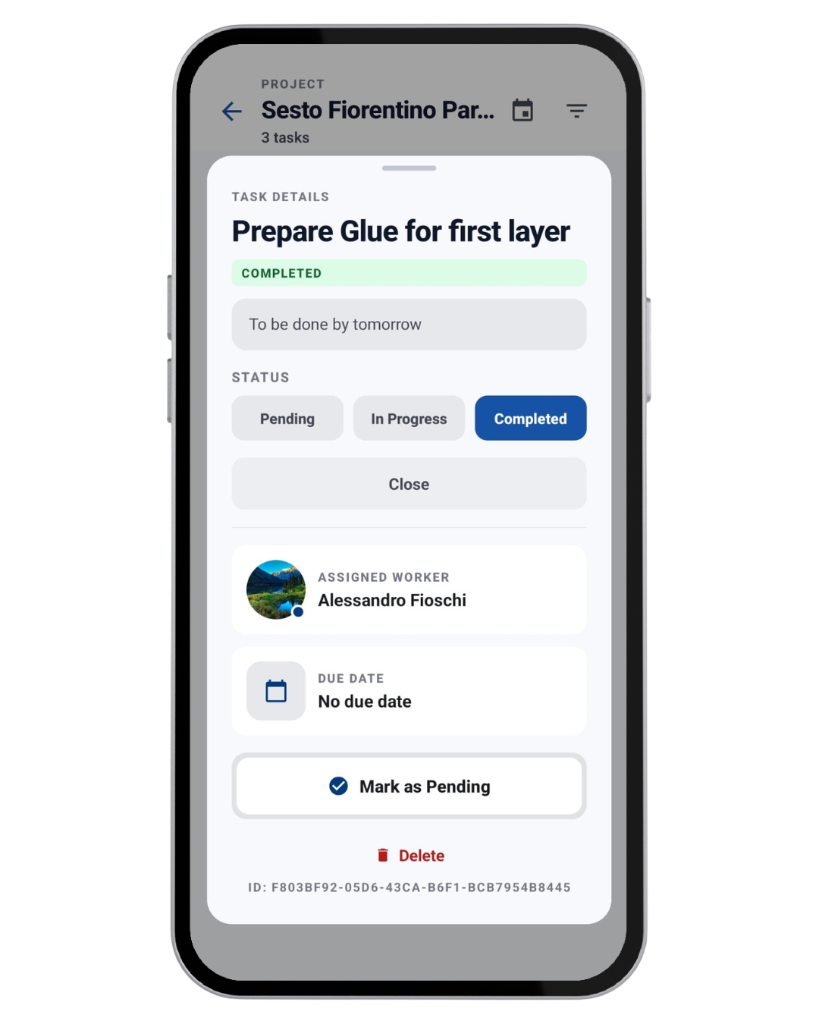
Create a task from the project Tasks screen and save it to that project. Open it later to review the details or update them.
Construkt does not assign construction project tasks automatically, send task reminders, build task dependencies, or create recurring construction tasks.
The task list is built for a quick scan of what is open, who owns it, and when it is due.
Show All, Pending, In Progress, or Completed.
Limit the list to one person, including tasks that have no assignee.
Sort by due date, earliest or latest first, or show the newest tasks first.
Use the row checkbox to switch a task between Completed and Pending.
Open a task for full status control and the rest of its details.
Status labels, assignee photos, the task count, and due dates make the list easy to read. Overdue dates are highlighted on pending and in-progress tasks.
A supervisor can see unfinished work and who is responsible without searching messages or a separate list. Construkt does not escalate overdue tasks or send reminders on its own.
Construction tasks sit alongside Planning for the same project, so the task list and the schedule stay in one place.
That keeps the same work from living as two disconnected items. Creating a task does not automatically create a calendar event, and Construkt does not optimize the schedule or assign crews.
A project task can stay connected to the photos, activity, and reports that belong to the same job.
When photo capture starts with a task already in context, those photos can be linked to that task.
Creating, completing, and updating a task can appear in the project’s activity feed.
Where the report configuration supports it, an export can include task titles, assignees, statuses, and summary counts.
On plans that include analytics, completed tasks can contribute to company-level activity metrics.
A task does not require a photo, and not every task update is included in every report.
Teams can use the project task list as a practical checklist for work that is still open on site.
Track the remaining steps of a piece of work until it is finished.
Give an outstanding problem an owner, a status, and a due date.
List what still needs a look before the job is handed over.
Keep the last open items visible until they are done.
These are ways to use the task list. Construkt does not add a separate punch-list module, automatic inspections, task dependencies, or a formal digital sign-off.
Project settings can prevent a project from being closed or converted until every task on it has been completed.
Open the project task list and see what is still pending or in progress.
Complete the site work those tasks describe.
Update each relevant task to Completed.
Once the task requirement is met, close or convert the project yourself.
Completing the last task does not close the project. Someone still has to take that action. The list is a practical checklist before a job is marked complete or handed to a separate maintenance workflow.
Project tasks help the people on a construction job see who owns the work and what is still open. A task can only be assigned to someone who is already a member of that project team.
It is software for the work on a construction project: what needs doing, who it is assigned to, its status, and its due date. In Construkt, that list belongs to one project.
Yes. Assign a task to a member of that project’s team, or leave it unassigned. People who are not on the project team cannot be assigned.
Yes. A due date is optional. On pending and in-progress tasks, an overdue date is highlighted in the list.
Yes. Filter by All, Pending, In Progress, or Completed, and filter by assignee, including tasks with nobody assigned. You can also sort by due date or show the newest tasks first.
Tasks with a due date can appear on that project’s planner timeline when task display is turned on. A calendar event can also be linked to its source task. Creating a task does not automatically create a calendar event.
Yes, when photo capture is started with that task in context. The photos stay associated with the work item. A task does not require a photo.
Where the report configuration supports it, an export can include task titles, assignees, statuses, and summary counts. Not every task update is included in every report.
Yes, when that option is turned on in project settings. The project cannot be closed or converted until its tasks are completed. Completing the tasks does not close the project by itself.
No. A construction project task is completed by changing its status. That screen does not use the photo-proof rule from the maintenance task workflow.
A construction project task belongs to one construction project and tracks work on that job. A maintenance task belongs to a maintenance job and follows that service workflow, including its own completion rules. The two lists, their fields, and their screens stay separate.
Assign work, track progress, and keep outstanding tasks organized on every project with Construkt.
Download App