Turn project information into reports
The PDF is generated from the job workspace, so you are not rebuilding the week in a word processor.
A site report should come from the job — photos, logs, tasks, and project details — not from a weekend spent collecting files. Construkt generates a PDF from the project record you already keep.
Someone dumps photos from three phones. Someone else types a summary from memory. The drawing is last week’s version. That is not reporting — that is recovery.
Construction reporting software, in Construkt, means: the project already holds the photos, logs, and tasks, so the PDF is an export, not a collage. You still decide what goes in. You still send it. You do not get a promise that the file is filed with a court or a public agency.
Project information → photos, logs, tasks, and records → report → PDF you share.
Open the job whose update you need. Do not start a blank document and import chaos.
Photos, daily logs, tasks, materials, and client details are on the project if the crew has been working in Construkt.
Pick sections, language, and photo quality. The report is assembled from that job, not from a generic template stuffed with leftover images.
Export from the project when you need a file you can send.
Send it the way you already send files. Construkt does not claim to auto-deliver reports to clients.
The PDF is generated from the job workspace, so you are not rebuilding the week in a word processor.
Add site photos that already belong to the project — including time and GPS context when those were captured.
Bring the day’s notes into the same file as the pictures, instead of pasting a separate recap.
Show work that was assigned and closed on the job, not a task list you invented for the PDF.
Each export belongs to a job. You are not mixing two sites in one pack because the files happened to be in the same download folder.
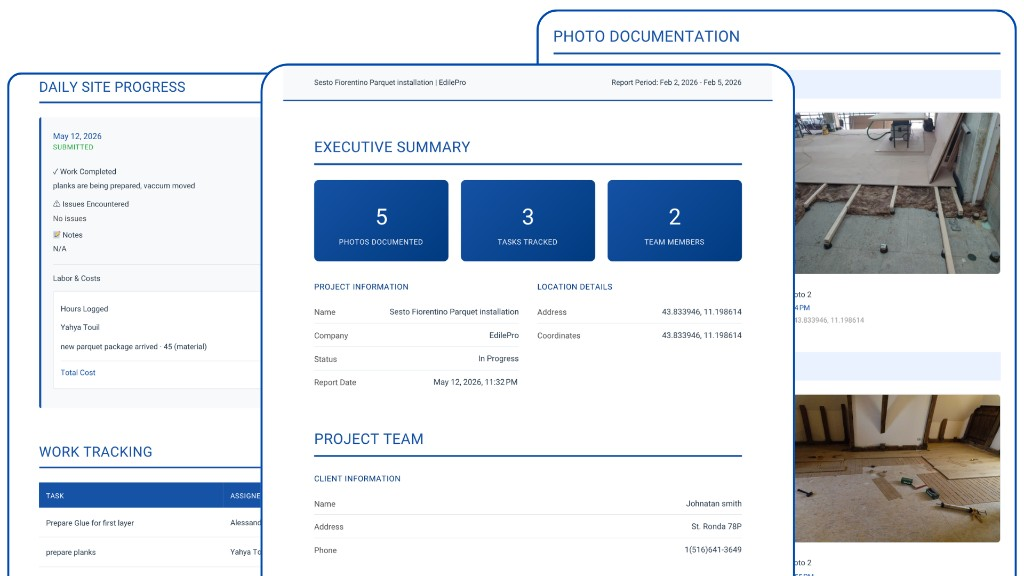
Produce a client-readable PDF with a job summary, logs, tasks, and photo documentation from that project.
Once the file exists, send it. The hard part — gathering the record — should already be done on the job.
Because reports come from the project record, you can return to the same job later instead of losing the last update in someone’s Sent folder.
A PDF built from the job: photos, tasks, daily logs, materials, GPS and timestamps, and client details — you choose what to include, language, and photo quality.
No automatic client mailing is claimed here. You generate the PDF from the project, then share it yourself — email, Drive, WhatsApp, or however you already send files.
Construkt produces a professional project PDF from the information on the job. It does not claim legal, contractual, or jurisdiction-specific compliance. Use it as an organized update, then follow your own requirements.
If the photos were captured in Construkt on that project, they are already on the job. The report starts from that record instead of a desktop folder you built at 10pm.
Keep the record in Construkt, then generate a PDF when you need to send an update.
Download App