Manage construction projects in one place
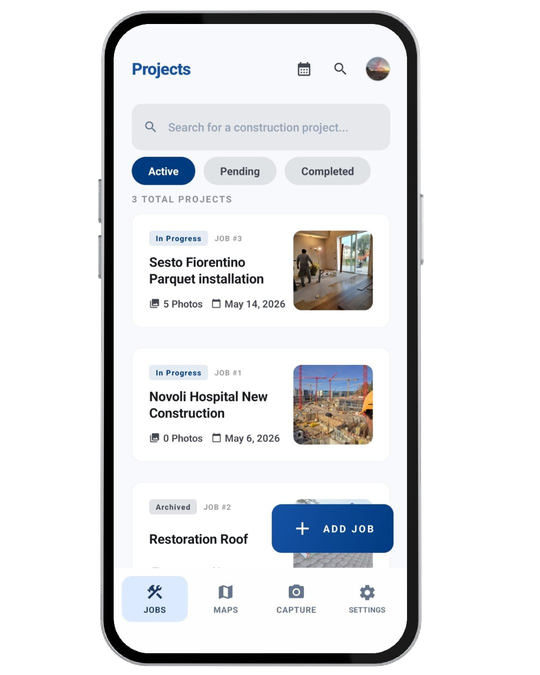
Create a job with a name and address, then keep photos, drawings, tasks, logs, and people on that same project instead of starting a new thread every time the crew changes.
Construkt keeps each job’s photos, drawings, tasks, daily logs, crew details, materials, activity, and reports in one project workspace — so what happens on site stays attached to the project it belongs to.
A typical week still looks like this: progress photos in someone’s camera roll, a drawing in email, a task list in a group chat, and a daily note in a notebook that never gets typed up. When the client asks what happened last Thursday, nobody knows which file is current.
Construction management software should make that record easier to keep, not add another dashboard nobody opens in the rain. Construkt is a simple site management workspace: open the project, capture work as it happens, and leave a trail the rest of the team can actually find later.
Everything below lives on the job — not in a generic company inbox.
Create a job with a name and address, then keep photos, drawings, tasks, logs, and people on that same project instead of starting a new thread every time the crew changes.
Photos taken in Construkt are tagged with time and GPS and filed to the job, so you are not hunting through a mixed camera roll when a client questions a stage of work.
Open PDFs and drawings on site, zoom and page through them, and keep the plan attached to the right project instead of forwarding the same attachment all week.
Create tasks, assign them to crew, and update status from the field — pending, in progress, or done — without a separate spreadsheet that only the office updates.
Log the day’s work against the project so notes about conditions, delays, and progress sit next to the photos and tasks from the same job.
Invite team members, assign Owner or Member roles, store client contact on the job, and see activity on the project instead of reconstructing it from chat history.
Keep materials and job details with the project record so they can show up when you put a report together, rather than living in a side note on someone’s phone.
Export a PDF from the job with the photos, tasks, logs, and details you choose — ready to share by email, Drive, or WhatsApp.
Timelines, activity, and audit-style history stay on the project, so you can see what was captured, who worked on it, and how the record changed over time.
If your day is spent on jobs — not in a back-office ERP — this is the workspace those jobs should live in.
No. Construkt is built for site operations and project records — photos, drawings, tasks, daily logs, crew information, materials, activity, and reports. It is not accounting, payroll, CRM, or a job marketplace.
Teams that need one project workspace on site: general contractors, construction managers, supervisors, foremen, and trade crews who currently split work across camera rolls, chats, and spreadsheets.
No. It organizes what happens on the job around each project. Keep using whatever you already use for estimating, accounting, or bidding.
Yes. You can invite crew members, assign roles, and keep tasks, photos, and notes on the same job so the team is looking at the same record.
Download Construkt and start the next project with photos, tasks, and logs on the same job.
Download App