One pin per geolocated job
Coordinates are stored on the job itself. A job can receive them from the device location when it is created.
Managing work across multiple locations? Construkt puts your construction projects and maintenance jobs on one map, so you can find sites, check their status, and open the right job without searching through a long list.
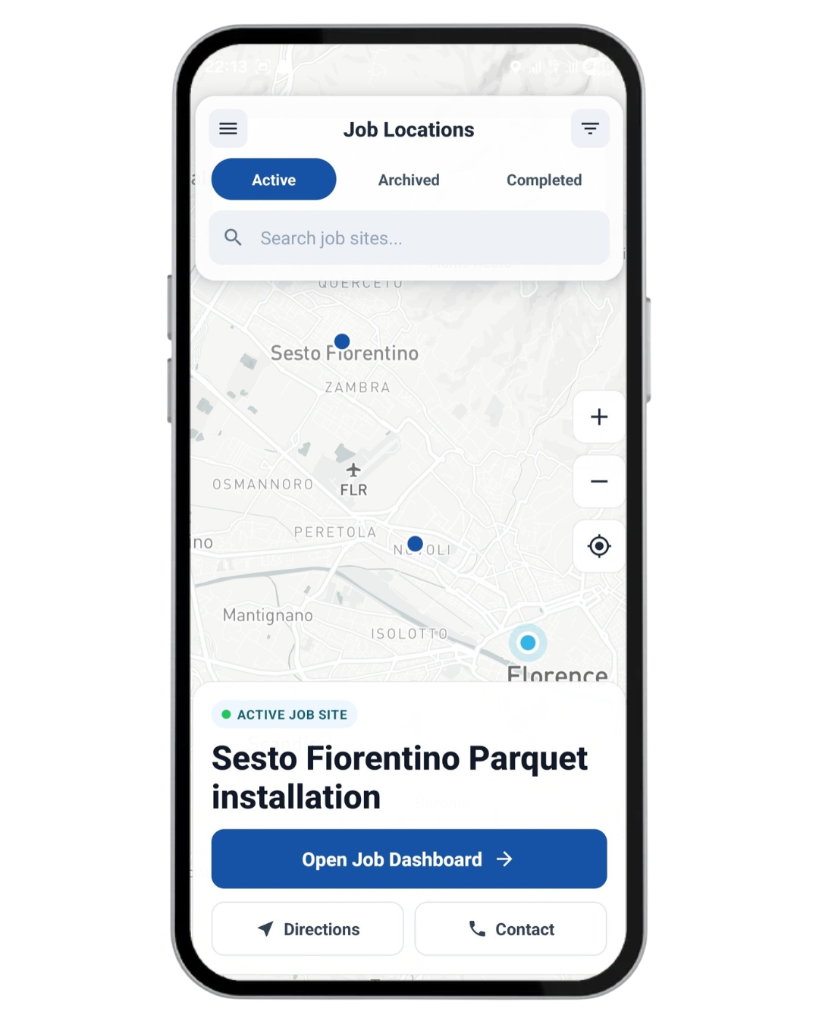
The Maps tab in the Construkt mobile app opens a company-wide Job Locations map. Jobs that have valid saved latitude and longitude appear as pins.
Coordinates are stored on the job itself. A job can receive them from the device location when it is created.
Construction projects and maintenance jobs with saved coordinates can both appear on the same map.
See sites across a city or region without opening each job one by one.
When many sites sit close together, nearby pins can cluster until you zoom in.
A job without valid GPS coordinates does not appear on the map. Construkt does not invent a location for it.
Narrow the Job Locations map to the sites you need, then zoom into an area or fit the visible pins in view.
Search jobs by name instead of scrolling a long list.
Show Active, Completed, or Archived jobs. Construction jobs can also be filtered by type, including Residential, Commercial, Industrial, Infrastructure, Renovation, New Construction, Demolition, and Landscape.
Zoom in and out, then use the map’s fit control to frame the visible job pins. That control frames pins on the map. It does not track your live GPS location.
Filters and search apply to jobs that already have coordinates. They do not add jobs that were never geolocated.
The map is connected to the job record. Tap a pin to move from a location to the work itself.
Select the site you want to inspect.
See relevant job information, including status.
Go straight into that job from the card.
If a client phone number is available, you can call. You can also open directions to the saved coordinates.
This is a map of jobs, not a live picture of people or vehicles moving around a site.
From the job card, you can open Google Maps directions using the job’s saved coordinates.
Construkt hands the saved coordinates to Google Maps. Navigation happens there, not inside Construkt.
Job settings can also offer navigation using coordinates or a client address.
Construkt does not plan multi-stop routes, optimize a day’s travel, monitor traffic, or dispatch crews from this map.
Jobsite pins and photo GPS answer different questions. One is where the job is. The other is where a photo was taken.
Shows where a construction project or maintenance job is located, when that job has saved coordinates.
A site photo can store latitude, longitude, and capture time. That information can appear in photo details and in relevant PDF reports, with small location previews on photo screens.
Individual photos are not plotted as pins on the company-wide Job Locations map. How Construkt files site photos
These are example workflows, not stories about a particular customer.
View active construction projects spread across different locations.
Find the right project, open its dashboard, and review the job.
Locate maintenance jobs and launch directions to the site.
Find the assigned job location without copying coordinates by hand.
The map only shows jobs that already have valid coordinates.
Create a construction project or a maintenance job.
Save valid GPS coordinates on that job. They can come from the device location during creation.
Open the Maps tab in the Construkt iOS or Android app.
Search by name or filter the visible jobsites.
Open the job dashboard or get directions from the job card.
The interactive Job Locations map is built for the Construkt iOS and Android apps.
The browser version does not currently provide the same interactive company map. The screenshot on this page is a product image, not a live embedded map.
The Job Locations map is for construction and maintenance teams that need to see where jobs are, not to track people in real time.
It is a map of where construction projects and maintenance jobs are located. In Construkt, that map lives in the mobile app under Maps, labeled Job Locations.
Each job with valid saved latitude and longitude can appear as a pin. Coordinates are stored on the job. Nearby pins can cluster when many sites are visible.
No. Only jobs with valid saved GPS coordinates appear. A job without coordinates is not shown.
Yes. Filter by Active, Completed, or Archived. Construction jobs can also be filtered by supported job types.
Yes. Search jobs by name on the Job Locations map.
Yes. Tap a pin, review the job card, and open that job’s dashboard.
Yes. You can open Google Maps directions to the job’s saved coordinates. Construkt does not provide in-app turn-by-turn navigation.
Yes. Maintenance jobs with saved coordinates can appear on the same Job Locations map as construction projects.
No. The Job Locations map shows saved job coordinates. It does not track workers, crews, vehicles, or equipment in real time.
No. Photo GPS stays on the photo record and can appear in photo details and relevant PDF reports. Photos are not individually plotted on the company-wide Job Locations map.
No. The interactive Job Locations map is available in the iOS and Android app. The browser version does not currently provide the same interactive company map.
Find construction and maintenance jobs on the map in the Construkt mobile app, then open the job or get directions from there.
Download App