Organize photos by project
Shoot inside the app so images file to the active job. You are not creating a new album by hand at the end of the week.
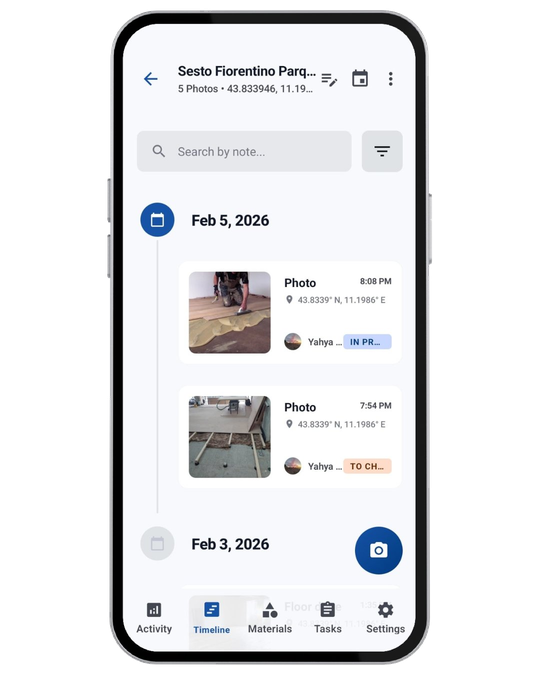
Crews take hundreds of photos. Finding the right one later is hard when they live in personal camera rolls, chats, and unnamed folders. Construkt files shots to the project, with time, GPS, and a timeline you can actually scroll.
Waterproofing, rebar, deliveries, and snagging all look similar six weeks later — especially when they sit between family photos and another site’s work.
Construction photo management is not “storage.” It is being able to open a job, jump to a day, and see what was shot there. That only works if the photo was associated with the project when it was taken, not renamed in a panic before a client call.
A phone gallery stores files. A project record answers: which job, which day, where on site, and what else happened around that shot.
On a camera roll, a photo is an image file. In Construkt, it belongs to a job, appears in that job’s timeline, and can sit alongside tasks and logs from the same work. GPS and timestamps add context for the team reviewing progress later. Treat that as supporting project information — useful for internal reviews and client updates — not as a courtroom guarantee.
Shoot inside the app so images file to the active job. You are not creating a new album by hand at the end of the week.
Time and location can travel with the photo so a later review can see when and where it was taken — as supporting records, not legal certification.
Scroll the job by day. Progress is easier to explain when the pictures are already in order instead of sorted by ‘recent’ on a phone.
The same project holds tasks, notes, and photos, so a picture of completed work can sit next to the task it relates to.
Open the job, go to the date, find the shot. That is faster than asking three people to screenshot their camera rolls.
Include selected photos when you generate a PDF from the project, instead of dragging files into a desktop document the night before.
A timeline of job photos is a practical progress record for the crew and the client — as long as the photos were captured against that job.
Photos taken in the app are attached to the project and shown in a chronological timeline. They can include GPS and timestamps so you can see when and where a shot was captured.
No. Location and time stamps can provide useful supporting project records. They do not, by themselves, make a photo legally certified evidence. Follow your contract and local requirements for formal records.
Yes. When you export a PDF from the job, you can include photos along with tasks, logs, and other project details you choose.
Those shots stay on personal phones unless someone files them. Construkt is for capturing and keeping photos as part of the project, so the team is not dependent on one person’s gallery.
Use Construkt so site photos are timestamped, located, and filed before anyone has to search for them.
Download App